Building Beautiful API Documentation with Scalar and Multi-Version Support in .NET 10

Bhrugen Patel
Author

RESTful Web API in .NET Core - The Beginners Guide (.NET 10)
Beginner course on RESTful API with ASP.NET Core Web API that will take you from basics of API and teach you how to consume it.
Building Beautiful API Documentation with Scalar and Multi-Version Support in .NET 10
API documentation is crucial for any modern web application. In this guide, I'll walk you through implementing Scalar API documentation with multi-version support in .NET 10. Scalar provides a beautiful, interactive documentation UI that's more modern and user-friendly than traditional Swagger.
💡 Key Insight
You don't need complex API versioning middleware! Scalar's multi-document feature works beautifully with just the [ApiExplorerSettings(GroupName = "vX")] attribute.
What We'll Build
✅ By the end, you'll have:
- • Multi-version API (v1 and v2) with separate endpoints
- • Scalar documentation with interactive UI
- • Multiple OpenAPI documents (one per version)
- • JWT Bearer authentication support
Prerequisites
Install the Scalar package:
<PackageReference Include="Scalar.AspNetCore" Version="1.2.65" />That's it! No API versioning packages needed.
Step 1: Create Version-Specific Controllers
The key is using [ApiExplorerSettings(GroupName = "vX")] on your controllers.
V1 Controller
[Route("api/v1/villa")]
[ApiExplorerSettings(GroupName = "v1")]
[ApiController]
public class VillaController : ControllerBase
{
    [HttpGet]
    public async Task<IActionResult> GetVillas()
    {
        var villas = await _db.Villa.ToListAsync();
        return Ok(villas);
    }
}
V2 Controller (with Pagination)
[Route("api/v2/villa")]
[ApiExplorerSettings(GroupName = "v2")]
[ApiController]
public class VillaController : ControllerBase
{
    [HttpGet]
    [Authorize]
    public async Task<IActionResult> GetVillas(
        [FromQuery] int page = 1,
        [FromQuery] int pageSize = 10)
    {
        var skip = (page - 1) * pageSize;
        var villas = await _db.Villa.Skip(skip).Take(pageSize).ToListAsync();
        return Ok(villas);
    }
}| Feature | V1 | V2 |
|---|---|---|
| Pagination | ❌ Returns all | ✅ Page + PageSize |
| Route | /api/v1/villa | /api/v2/villa |
| Auth | ❌ Optional | ✅ Required |
Step 2: Register OpenAPI Documents
Simple - just one line per version!
builder.Services.AddOpenApi("v1");
builder.Services.AddOpenApi("v2");
✅ Why This Works
Controllers with GroupName = "v1" appear in /openapi/v1.json, v2 controllers in /openapi/v2.json. No complex middleware!
Step 3: Configure Scalar UI
var app = builder.Build();

app.MapOpenApi();

app.MapScalarApiReference(option =>
{
    option.Title = "Royal Villa API";

    option
        .AddDocument("v1", "API Version 1.0", "/openapi/v1.json", isDefault: true)
        .AddDocument("v2", "API Version 2.0", "/openapi/v2.json");
});
💡 What's Happening?
MapOpenApi()exposes the JSON endpointsMapScalarApiReference()configures the UIAddDocument()adds each version to dropdown
Step 4: Controller Attributes Explained
The Magic: ApiExplorerSettings
[ApiExplorerSettings(GroupName = "v1")]This is the most important attribute for Scalar's multi-document feature! It tells the OpenAPI generator:
- • "This controller belongs to the v1 document"
- • Only include these endpoints in /openapi/v1.json
Example:
// V1 Controller - appears ONLY in v1 document
namespace RoyalVilla_API.Controllers.v1
{
    [Route("api/v1/villa")]
    [ApiExplorerSettings(GroupName = "v1")]  // ?? Key attribute!
    [ApiController]
    public class VillaController : ControllerBase
    {
        [HttpGet]
        public async Task<IActionResult> GetVillas()
        {
            var villas = await _db.Villa.ToListAsync();
            return Ok(villas);
        }
    }
}

// V2 Controller - appears ONLY in v2 document
namespace RoyalVilla_API.Controllers.v2
{
    [Route("api/v2/villa")]
    [ApiExplorerSettings(GroupName = "v2")]  // ?? Different group!
    [ApiController]
    public class VillaController : ControllerBase
    {
        [HttpGet]
        [Authorize]
        public async Task<IActionResult> GetVillas(
            [FromQuery] int page = 1,
            [FromQuery] int pageSize = 10)
        {
            // Pagination logic
            return Ok(villas);
        }
    }
}
Route Templates
// V1 - Explicit version in route
[Route("api/v1/villa")]

// V2 - Also explicit (we keep it simple!)
[Route("api/v2/villa")]
Both use explicit versioning in the route. This is the simplest and most readable approach.
💡 Pro Tip
You can use dynamic versioning like [Route("api/v{version:apiVersion}/villa")] if you set up API versioning middleware, but it's not required for Scalar's multi-document feature!
Step 5: Testing the API Documentation
Access Your Documentation
- 1. Start your application
-
2.
Navigate to:
https://localhost:7297/scalar
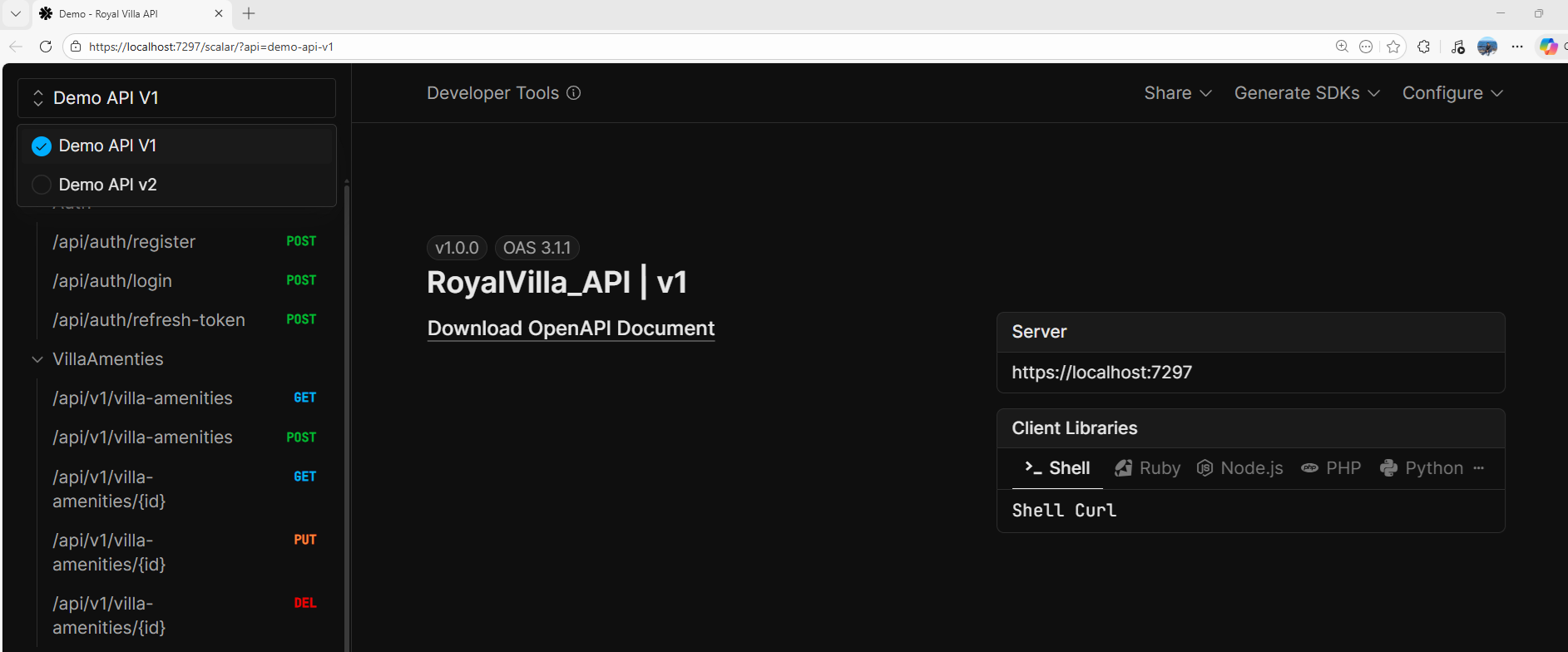
Version Switching
Click the version dropdown in the top-right to switch between:
- • API Version 1.0 - Simple CRUD operations
- • API Version 2.0 - Paginated results with authentication
💡 Production Considerations
While our tutorial focuses on simplicity to teach the core concepts, here are some professional improvements you might consider for production:
1. Generic Response Model
Our examples use simple IActionResult with direct returns:
[HttpGet]
public async Task<IActionResult> GetVillas()
{
    var villas = await _db.Villa.ToListAsync();
    return Ok(villas);  // ✅ Simple, but no standardization
}
For production, consider a generic response wrapper for consistency:
public class ApiResponse<T>
{
    public bool Success { get; set; }
    public int StatusCode { get; set; }
    public string Message { get; set; }
    public T? Data { get; set; }
    public string? Errors { get; set; }
}

[HttpGet]
public async Task<ActionResult<ApiResponse<IEnumerable<VillaDTO>>>> GetVillas()
{
    var villas = await _db.Villa.ToListAsync();
    var response = ApiResponse<IEnumerable<VillaDTO>>.Ok(villas, "Villas retrieved successfully");
    return Ok(response);  // ✅ Standardized response format
}
✅ Benefits:
- • Consistent API responses across all endpoints
- • Easier client-side error handling
- • Better documentation in Scalar
- • Standardized success/error messaging
🚀 Best Practices
1. Versioning Strategy
For Scalar multi-document, we use:
URL Versioning with GroupName: /api/v1/villa + [ApiExplorerSettings(GroupName = "v1")] ✅
Simple, explicit, and works perfectly with Scalar.
Alternative approaches (if you need full API versioning middleware):
-
•
Dynamic Route with ApiVersion:
[Route("api/v{version:apiVersion}/villa")]+[ApiVersion("1.0")] -
•
Header Versioning:
api-version: 1.0header -
•
Query String:
/api/villa?version=1.0
All of these require API versioning middleware, which we've intentionally avoided for simplicity!
2. Controller Organization
Keep versions in separate namespaces:
Controllers/
+-- v1/
¦   +-- VillaController.cs
¦   +-- VillaAmenitiesController.cs
+-- v2/
¦   +-- VillaController.cs
¦   +-- VillaAmenitiesController.cs
Each controller has [ApiExplorerSettings(GroupName = "vX")] - that's the key!
3. Backward Compatibility
- • Never break v1 - Keep it stable
- • Add features in v2 - Don't remove v1 functionality
- • Deprecate gracefully - Give users time to migrate
🎬 Conclusion
We've successfully implemented a professional-grade API documentation system using Scalar with multi-version support. The best part? It's incredibly simple!
⚡ Quick Recap:
- Add
AddOpenApi("vX")for each version - Use
[ApiExplorerSettings(GroupName = "vX")]on controllers - Configure Scalar with
AddDocument()for each version - No complex versioning middleware needed!
- Beautiful UI with interactive testing
Now go build some amazing APIs with beautiful documentation!